
- How to Make Games in Unreal Engine 5…
- Getting Started with Megalights in Unreal Engine 5.8…
- 製品の形と色を変えずに、CGを生成AIでフォトリアルに。FLUXでモデル比較検証
- [UE5] シーケンサーの Event Trackはヒッチで飛ぶのか調査してみた
- キャラクターのランタイム カスタマイズを実行できる Mutable Sample が UE 5.8 向けに更新されました!
- Fast-paced action RPG Phantom Blade Zero takes full…
- 売上2,000万本の『めっちゃカメレオン』を2か月で作った開発者へのインタビュー記事をEpic Gamesが公開。EOSを活用し、同接34万人超でも利用料はゼロ
- Meccha Chameleon: How two devs built the indie…
- Quixel メガドロップ: 歴史遺産のメガドロップ | Megascans アセット on Fab
- [UE5.8] Metahumanを触ってみよう!遊んでみよう!
- [UE5.8] Metahumanを触ってみよう!遊んでみよう!
- Last week, we showed off next-gen Unreal Engine…
- 3KB以下のゲームを制作・公開。「Pyxel」開発者が新たなオープンソースエンジン「Playload」をリリース。今週のゲーム開発関連ツールまとめ
- Turning Music into Playable Worlds with SoWhen? |…
- AI を駆使して 5 万米ドル獲得を目指そう:2026 Epic AI MegaJam がまもなく開催
- 【UE5】Unreal/C++を始めるときにやってみると良いこと
- See Zebra Sample in Action: Live Animation Demo…
- UE 5.8's Iris system provided crucial communication between…
- [UE5]EUW向けノードプチまとめ(Level Creation編)
- 【UE5】UIをC++と組み合わせて実装してみよう
- 5.8.4 Hotfix Released
- アニメーターに欠かせない Fab 製品 10 選
- Fab期間限定無料コンテンツ更新!
- See Zebra Sample in Action: Live Animation Demo…
- S.A.M – Solo Animation Mode
- UE – TCA: Russel (R. Russel Roberts, Admiral…
- UE5 + ADXで、データテーブルの更新と検証をEditor Utility Widgetで行う【GameplayTag活用編6】
- UE5 + ADXで、サウンドデータテーブルをAtomCraftロボットから自動構築する【GameplayTag活用編5】
- Unreal Engine 5 Beginner Tutorial 2026 - UE5…
- 火曜まで。Fabの期間限定無料コンテンツ。お忘れなく
- 【UE5】ナイトビジョンポストプロセス作ってみる
- Simulating a LiDAR sensor using Hardware Raytracing in…
- UEFN Student Bootcamp | Class of 2026 Sizzle…
- 【UE5】正規表現を使う方法とエディタ拡張でのコンテンツパイプラインの自動化について
- State of Mobile Workflows in Unreal Engine 5.8…
- Register today for our free UEFN Professional Bootcamp!
- SILENT HILL: Townfall | Game Profile | Unreal…
- 無償のUE5.3と有償のUE5.4以降、どれだけ違う?ライセンス・新機能・移行判断を整理する
- Arm Neural Graphics Playbook
- Unreal Engine's Sequencer helped bring the drama and…
- 無償のUE5.3と有償のUE5.4以降、どれだけ違う?ライセンス・新機能・移行判断を整理する
- [UE5]歩いたところが見えるようになる!霧付きミニマップをつくろう!
- 10 月の Fab フラッシュ セールがスタートしました!
- Building UEFN Source Assets for Fab | Creating…
- Star Wars: Galactic Racer™ | Game Profile |…
- LEGO Batman: Legacy of the Dark Knight |…
- アンリアルフェストソウル2026の講演が一挙に投稿。
- Unreal Fest Tokyo 2026
- 【UE5】TArrayで知っておくべき仕様
- A First Look at Unreal MCP in Unreal…
- How to Use Iris’ Filtering System
- Unreal Engine's World Partition was a real boon…
- Artist's Guide to Using MegaLights in Unreal Engine…
- State of Mobile Workflows in Unreal Engine 5.8…
- [UE5]マテリアルでパーツを出現させてみよう
- Fab期間限定無料コンテンツ更新!
- Ozone Subdivision Surfaces: Character Modeling Best Practices |…
- Server browser with Epic Online Services
- Cross-Platform Mobile Games Sizzle Reel | Unreal Engine
- Fighting the Frame Budget: Stage Optimization Lessons from…
日本語注目情報
- [UE5] シーケンサーの Event Trackはヒッチで飛ぶのか調査してみた
 2026.10.28 に
執筆バージョン: Unreal Engine 5.4 はじめに 今回はレベルシーケンサーやUMGアニメーションにて採用される Event Trackについて、ヒッチ発生時の挙動を検証してみました シーケンサーは演出や U The post [UE5] シーケンサーの Event Trackはヒッチで飛ぶのか調査してみた first appeared on historia Inc – 株式会社ヒストリア.
- キャラクターのランタイム カスタマイズを実行できる Mutable Sample が UE 5.8 向けに更新されました!
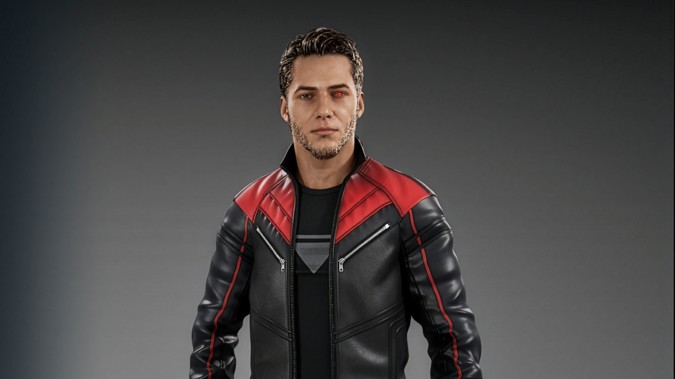 2026.10.28 に
https://www.unrealengine.com/news/mutable-sample-for-runtime-character-customization-now-updated-for-ue-5-8www.unrealengine.com
- めっちゃカメレオン:2 人のデベロッパーが夏の大ヒット作となったインディー ゲームを作り上げた方法
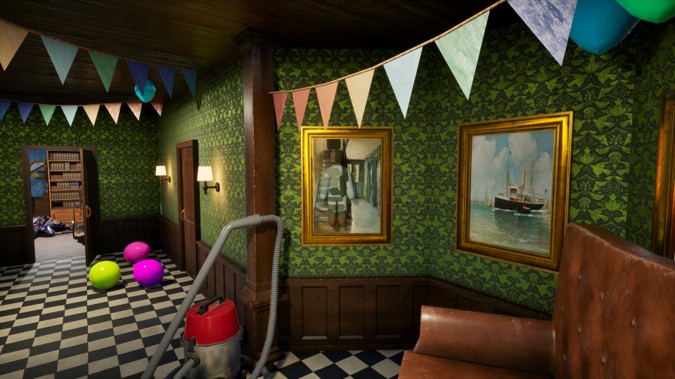 2026.10.27 に
https://www.unrealengine.com/developer-interviews/meccha-chameleon-how-two-devs-built-the-indie-smash-hit-of-the-summerwww.unrealengine.com
- Quixel メガドロップ: 歴史遺産のメガドロップ | Megascans アセット on Fab
 2026.10.26 に
Fabに登場した新しいQuixel Megascans 歴史遺産のメガドロップに含まれる、高品質な3Dアセットをこの動画でご紹介します。 封建時代の日本の城や活気あふれるスーク(市場)から、中世の港やゴシック様式の図書館まで。この大規模なCGアセットコレクションには、さまざまな時代へと誘う多彩な環境パックが揃っています。 […]
- [UE5.8] Metahumanを触ってみよう!遊んでみよう!
 2026.10.25 に
Metahumanを触ったことない人を対象に、Metahumanでどんなことができるのかを体験し遊ぶチュートリアルです。細かなデータや理屈は抜き。Metahumanを様々な方法で作成したり動かしたりして楽しみましょう!
- [UE5.8] Metahumanを触ってみよう!遊んでみよう!
 2026.10.25 に
Metahumanを触ったことない人を対象に、Metahumanでどんなことができるのかを体験し遊ぶチュートリアルです。細かなデータや理屈は抜き。Metahumanを様々な方法で作成したり動かしたりして楽しみましょう!
- AI を駆使して 5 万米ドル獲得を目指そう:2026 Epic AI MegaJam がまもなく開催
 2026.10.23 に
https://www.unrealengine.com/news/2026-epic-ai-megajam?lang=jawww.unrealengine.com
- [UE5]EUW向けノードプチまとめ(Level Creation編)
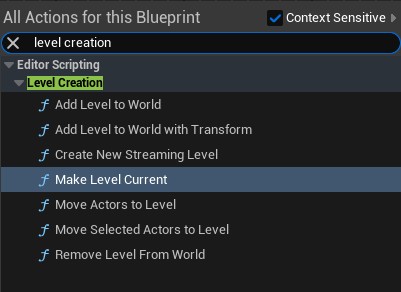 2026.10.21 に
執筆バージョン: Unreal Engine 5.4 エディタ操作用に用意されている色々なノード。 その中でLevel Creationカテゴリに割り当てられているノードに絞ったプチまとめです。 このカテゴ The post [UE5]EUW向けノードプチまとめ(Level Creation編) first appeared on historia Inc – 株式会社ヒストリア.
英語公式情報
- Getting Started with Megalights in Unreal Engine 5.8 I Epic Games Education Webinar
 2026.10.28 に
Discover how MegaLights in Unreal Engine 5.8 can transform the way you light your environments with thousands of dynamic, shadow-casting lights while maintaining performance. Now Production Ready in Unreal Engine 5.8, MegaLights enables more flexible lighting workflows, helping you create richly illuminated environments with realistic shadows and greater creative freedom. In this Epic Games Office Hours webinar, you’ll learn what MegaLights is, why you should use it, and how to get started. Follow us on Linkedin for more upcoming webinars: https://www.linkedin.com/showcase/unreal-engine-for-design-visualization Docs: https://dev.epicgames.com/documentation/unreal-engine/megalights-in-unreal-engine #UnrealEngine #UE58 #MegaLights #RealTimeRendering #GameDevelopment
- Turning Music into Playable Worlds with SoWhen? | Creating in Fortnite
 2026.10.27 に
Join the SoWhen? team for a look at how the Paris createch turns music artists’ worlds into playable experiences in Fortnite, from the Turbo Killer Experience with Carpenter Brut to Poppy Secret Run, created with Poppy. With UEFN open throughout the session, each team member will take viewers through their part of the work, sharing anecdotes, challenges and the approach behind it: capturing the artist’s own performance with markerless motion capture, keeping gameplay locked to the track, the custom tools the team built for its experiences, and how it uses Scene Graph. Expect an open conversation about what it takes to bring an artist’s universe into UEFN and make it hold up in play. Check out Poppy Secret Run here: https://www.fortnite.com/@sowhen/3416-2408-7383
- Fast-paced action RPG Phantom Blade Zero takes full advantage of Unreal Engine 5
 2026.10.27 に
Fast-paced action RPG Phantom Blade Zero takes full advantage of Unreal Engine 5 to achieve scale and quality with S-Game’s small team 🔪 Motion Matching using actual master martial artists, Nanite & Lumen for more ambitious graphic fidelity and more! Take a look at what S-Game founder & CEO Soulframe had to say on the use of UE in the game! You can grab the game tomorrow on the Epic Games Store!: https://store.epicgames.com/p/phantom-blade-zero-e78a35
- Last week, we showed off next-gen Unreal Engine tools/systems that run on mobile 📲
 2026.10.24 に
If you missed our deep dive with Epic experts Ari Arnbjörnsson, Arvind Neelakantan and Paul Georges, you can catch the VoD for the stream over on our YouTube channel: https://youtube.com/live/2OCeuCj0swQ
- See Zebra Sample in Action: Live Animation Demo in UE5.8 with Jeff Gabor | Inside Unreal
 2026.10.22 に
Join Principal Animator Jeff Gabor for a live animation demo in UE5.8 using the Zebra Character and Rig from the free Zebra Sample on Fab! See how Jeff approaches posing, rigging, and in-betweening as he brings the Zebra character to life, with practical tips and insights to help you level up your own animation workflows. Get the free Zebra Sample here: https://www.fab.com/listings/8bff9602-7087-4d86-b680-f55b263e8382
- UE 5.8’s Iris system provided crucial communication between client & server for Gears of War: E-Day
 2026.10.21 に
Unreal Engine 5.8’s new Iris replication system provided crucial communication between client and server for Gears of War: E-Day’s multiplayer, both competitive and cooperative🌐 The Coalition were able to take advantage of Iris to help with network updates as well as bandwidth management between servers and players. Check out our piece on the game and how Iris other UE features factored into development: https://epic.gm/dev-interviews-gears-e-day
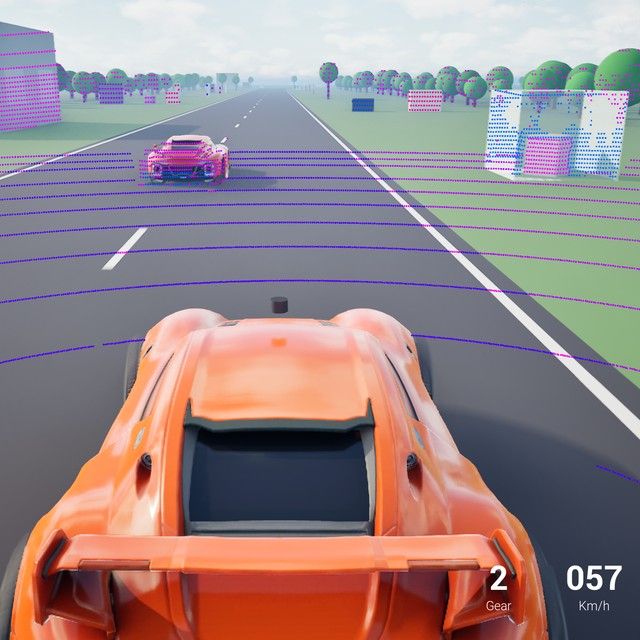
- Simulating a LiDAR sensor using Hardware Raytracing in Unreal Engine 5
 2026.10.17 に
Simulating a LiDAR sensor using Hardware Raytracing in Unreal Engine 5 | CourseIn this series of articles, we will explore the physical principles behind LiDAR sensors and how to simulate their behav…dev.epicgames.com
- Building UEFN Source Assets for Fab | Creating in Fortnite
 2026.10.16 に
UEFN source assets are now available on Fab! Join Derek Diaz, UI/UX Director at Epic Games, and Martín de Greiff, Fab Creator Success Manager, to learn how to build a UEFN source asset and publish it on Fab. Source assets are complete, editable systems for creating experiences in Fortnite. They open directly in UEFN, helping developers spend less time recreating systems that already exist and more time building. In this livestream, Derek and Martín will walk through how source assets work, how to create one, and how to publish them for sale on Fab. Learn more in the documentation:
0:00 Opening 3:50 Introductions: Derek Diaz & Martín (Fab Creator Success) 6:08 What does building/publishing UFN source assets mean? 11:43 Derek shares screen: Verse UI Kit project structure overview 13:19 Icons, meters, and material functions included in the kit 19:33 Live showcase: basic buttons, checkboxes, chips, radio groups 23:55 Toggle switches, pip ratings, and collapsible containers 26:28 Tabs, input selectors, and feedback toasts 28:47 Composite examples: vehicle control panel & full menu demo 33:00 Button anatomy breakdown: slots, highlight states, customization 40:01 The agents.md file for AI-assisted UI development 41:18 Transition to Martine: publishing to Fab walkthrough begins 44:34 Creating a new Fab listing: file upload & format selection 47:00 Description, licensing tiers (personal vs. professional) 51:03 Tags, discoverability, and listing best practices 52:17 Media gallery, thumbnails, and image requirements 55:37 Content guidelines: maturity ratings & AI disclosure 58:26 Submitting for review & moderation process explained 1:02:15 Discussion: why listing quality/effort matters 1:04:13 Derek returns: downloading the UI Kit into a new project 1:07:11 Demo: custom-styled UI kit examples (trade shop, village) 1:12:00 Village inventory screen deep dive: tabs, chips, filters 1:16:02 Discussion: learning by reverse-engineering existing assets 1:18:45 Q&A begins 1:19:28 Q&A: animation packs, build tool flexibility, demo levels 1:23:19 Q&A: publishing entity prefabs & MCP-assisted development 1:25:05 Q&A: custom licensing for quantity control / single-buyer sales 1:27:11 Q&A: IP infringement, resellers, and DMCA takedowns 1:29:41 Q&A: AI training data & the default Fab license 1:31:18 Discussion: why disclosing AI usage matters 1:34:58 Q&A: MCP-assisted content and AI disclosure requirements 1:37:14 Q&A: UFN-specific tags & tag list availability 1:38:31 Q&A: restricted product keys for QA testing 1:40:47 Q&A: expanding Fab to more engines/DCC tools 1:43:10 Q&A: uploading full projects for free & revenue share (88/12) 1:44:48 ClosingUpload Unreal Editor for Fortnite Source to Fab | Fab Documentation | Epic Developer CommunityPublish your Unreal Editor for Fortnite Source in listings in Fab.dev.epicgames.com
